Asynchronous Programming - Coroutine


At the Bank
You drove to the bank today to open a new account.
Oh no — when you got there, you found that this bank only had one teller window open.
Looks like you’ll have to wait a while.
After about an hour of waiting, it’s finally your turn.
You sit down in front of the teller and start the account-opening process.
The teller asks for your ID, but unfortunately, you left it in the car.
“I left my ID in the car — could you give me about 5 minutes?” you say, and step outside.
While you’re off fetching your ID, the teller takes care of some other work in the meantime.
Synchronous and Asynchronous
Customers were being served one at a time, in order. So you had about an hour where you couldn’t do anything but wait.
This is what we call synchronous. You have to keep waiting until the task in front of you is finished.
After your turn finally came, the teller handled some backlogged work while you went out to fetch your ID.
This is what we call asynchronous. The account-opening task is briefly paused, while other work moves forward in the meantime.
The key point here is that there was only one teller window. This is what we call a single thread.
You don’t need to fully understand what a thread is right now — feel free to set it aside for later.
But please do remember that there was only one window. It’ll come in handy when you start digging deeper.
Synchronous Programming
The title “Synchronous Programming” sounds intimidating, but there’s nothing to be afraid of.
The code you write every day is synchronous code.
Here’s an example:
void Start()
{
    WaitInChair(); // Wait in the chair for an hour
    MakeAccount(); // Ask the teller to open an account
}

void WaitInChair()
{
    int one_hour = 3600;

    for(int i = 0; i < one_hour; i++)
    {
        Debug.Log("Waiting for an hour...");
    }
}

void MakeAccount()
{
    Debug.Log("Opening account!");
}
This code won’t actually wait an hour — I just wrote it this way to make the idea feel more concrete.
Looking at the functions inside Start(), MakeAccount is only called after WaitInChair finishes.
Let’s visualize this with a diagram.
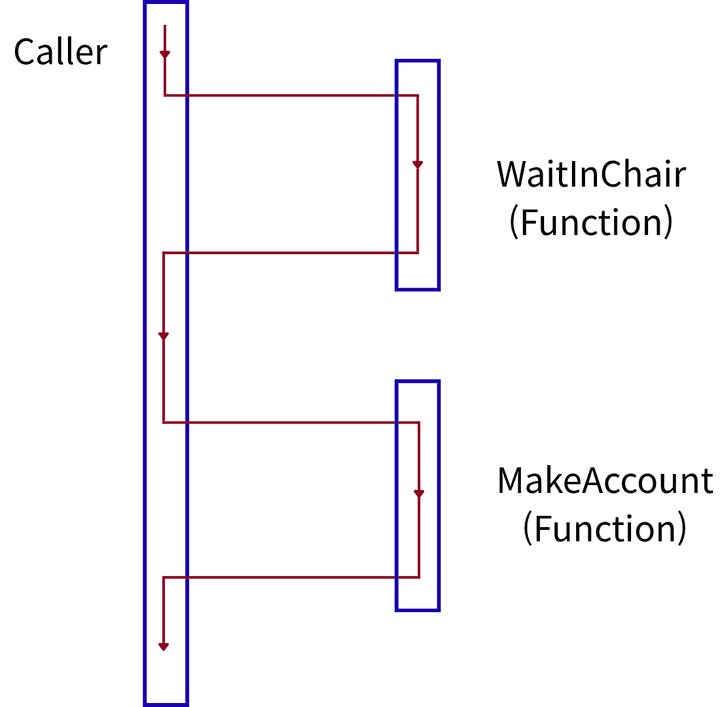 Synchronous Programming
This kind of sequential execution is called Synchronous Programming. This is what you’ve always been writing.
But notice — there’s nothing in this code that represents you saying “Just 5 minutes please!” or the teller doing other work in the meantime.
Asynchronous Programming
Now let’s look at the teller’s code.
void Start()
{
    StartCoroutine(MakeAccount()); // Start opening the account
    DoOtherWork(); // Other tasks
}

IEnumerator MakeAccount()
{
    Debug.Log("Teller : Opening your account!");
    Debug.Log("Teller : I'll need your ID.");
    Debug.Log("Customer : I'll go grab it — just 5 minutes!");

    yield return new WaitForSeconds(5f);

    Debug.Log("Teller : Account opened!");
}

void DoOtherWork()
{
    Debug.Log("Teller : Catching up on paperwork...");
}
Before diving into the syntax, let’s check what this code actually outputs.
Teller : Opening your account!
Teller : I'll need your ID.
Customer : I'll go grab it — just 5 minutes!
Teller : Catching up on paperwork...

(After 5 seconds)
Teller : Account opened!
The most important part of this code is the moment the customer says “Just 5 minutes please!”.
yield return new WaitForSeconds(5f);Let’s look at this in a diagram as well.
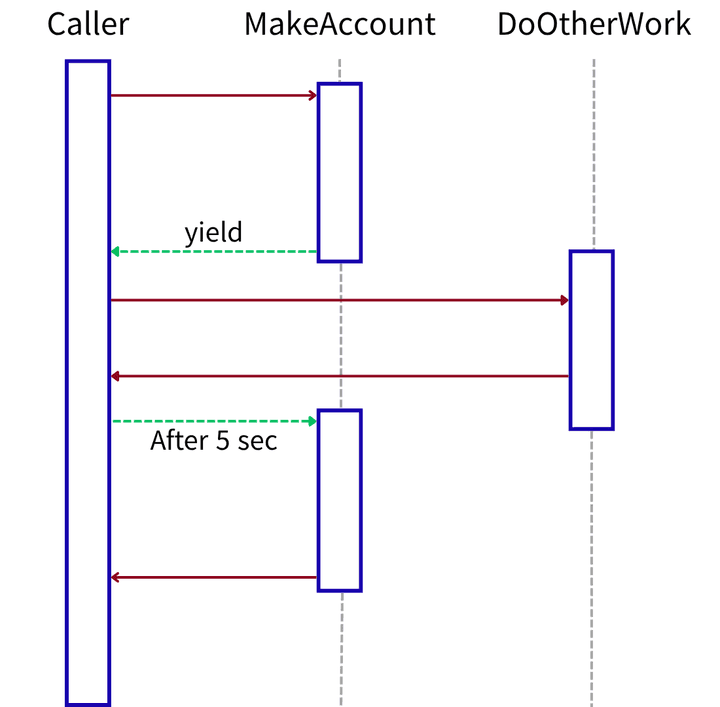 Asynchronous Programming
The teller pauses the account-opening task and moves on to the next one, DoOtherWork.
After 5 seconds, the teller comes back to the paused spot and continues opening the account.
One thing to clarify: the Start function itself actually ends the moment DoOtherWork finishes.
Unity manages the coroutine separately, so it wakes up at the paused spot 5 seconds later.
How Unity manages it under the hood isn’t covered in this post.
Next, let’s look at the syntax.
Coroutine
Computer science terms tend to be abstract, which can make them tricky to grasp.
In those cases, looking at what the word itself means often helps a lot.
The word coroutine comes from the prefix co- — meaning together, as in cooperate or coexist — combined with routine, a regular sequence of tasks.
Translated literally: “a routine that runs together with others”. Let’s see how this “together” part actually works.
To use coroutines in Unity, you only need to remember three things:
- Return type :
IEnumerator - Pause point :
yield return - Function call :
StartCoroutine()
Let’s go through them one by one.
IEnumerator
A regular function looks something like this:
void MakeAccount()
{
    Debug.Log("Opening account!");
}
This function returns void, so there’s no return value.
Now let’s look at a coroutine function:
IEnumerator MakeAccount()
{
    Debug.Log("Opening account!");
    yield return new WaitForSeconds(5f);
    Debug.Log("Account opened!");
}
A coroutine function returns IEnumerator.
And inside the function, you have to return values using yield return instead of a regular return.
yield return
The word yield literally means to give way or to hand over. Does the term make a bit more sense now?
Normally, a function doesn’t hand control back to its caller until it finishes — but by briefly yielding, the routine becomes a co-routine.
What you write after yield return determines how long the routine yields for.
Here are some commonly used examples:
yield return null; // Resume on the next frame
yield return new WaitForSeconds(5f); // Wait 5 seconds (affected by timescale)
yield return new WaitForSecondsRealtime(5f); // Wait 5 seconds (not affected by timescale)
yield return new WaitUntil(() => isTrue); // Wait until the condition becomes true
There are more types beyond these, but knowing these four is plenty to get started. You can look up the rest as you need them.
StartCoroutine
A regular function is called like this:
MakeAccount();Here’s how you call a coroutine:
StartCoroutine(MakeAccount());But what happens if you call a coroutine like a regular function?
void Start()
{
    MakeAccount(); // not StartCoroutine
}

IEnumerator MakeAccount()
{
    Debug.Log("Opening account!");
    yield return new WaitForSeconds(5f);
    Debug.Log("Account opened!");
}
The answer: no error is thrown, and not a single line of the function runs.
Since nothing gets logged to the console either, you must always launch a coroutine with StartCoroutine.
Coroutine functions are still functions, so you can pass parameters to them.
void Start()
{
    StartCoroutine(MakeAccount("Minssuy", 100));
}

IEnumerator MakeAccount(string name, int money)
{
    Debug.Log($"{name} : Opening an account with ${money} deposited!");
    yield return new WaitForSeconds(5f);
    Debug.Log($"{name} : Account opened!");
}
Minssuy : Opening an account with $100 deposited!
(After 5 seconds)
Minssuy : Account opened!StopCoroutine
What if, in the middle of opening the account, the customer suddenly says “I changed my mind!”?
The teller has to stop what they’re doing. Coroutines work the same way — you can stop them mid-execution.
To stop a coroutine, a bit of setup is required.
Coroutine accountCoroutine;

void Start()
{
    accountCoroutine = StartCoroutine(MakeAccount());
}
StartCoroutine actually returns a value — an object of type Coroutine.
By holding onto this object, you can reference that coroutine later. Now let’s use it to stop the coroutine.
Coroutine accountCoroutine;
bool feelings = true;

void Start()
{
    accountCoroutine = StartCoroutine(MakeAccount());
}

void Update()
{
    if(!feelings)
    {
        CancelAccount();
    }
}

void CancelAccount()
{
    StopCoroutine(accountCoroutine);
    Debug.Log("Customer : I changed my mind!");
}
There’s also StopAllCoroutines, which stops every coroutine on the current object at once.
You can look up how to use it whenever you need to.
Wrapping Up
In this post, we briefly looked at the concept of asynchronous programming and how to use coroutines.
But quite a few questions are left unanswered — here are the ones I think are worth sitting with:
- What exactly is
IEnumerator, that it can put a function on pause? - When execution resumes on the line after
yield return, how does the function remember its progress? - How does the Unity engine manage coroutines behind the scenes?
On top of that, since this post focused on building an intuition for coroutines, there are some small inaccuracies in the explanation.
In the next post, I’ll dig into how all this magic actually happens and uncover the real nature of coroutines.