0.1 + 1.1 == 1.2 is True.


Bias
If you’re a developer who’s ever dealt with decimals, you’ve probably come across this question at least once.
Many people say that 0.1 + 1.1 == 1.2 is False.
Well, let me rephrase the question slightly.
Are you sure that 0.1 + 1.1 == 1.2 is False?
The Problem
This article uses C# syntax in the Unity engine as a reference.
public class Test : MonoBehaviour
{
    float a = 0.1f;
    float b = 1.1f;

    void Start()
    {
        float c = a + b;
        Debug.Log(c == 1.2f); // result is true? false?
    }
}
Please pause scrolling and try to answer.
In the code above, would Debug.Log(c == 1.2f) output True or False?
Take about 5 seconds to think.
Have you thought about it? If you already know about this topic, 5 seconds was probably more than enough.
Let’s run it and see.
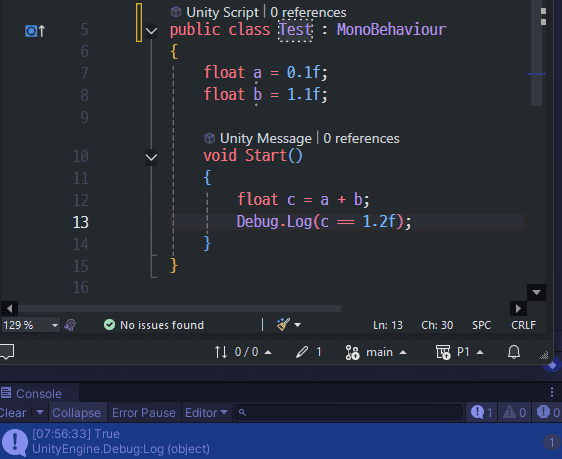 Result is True
Looking at the bottom of the image, the console says True.
At the very least, I was taught that float + float doesn’t work correctly, so I predicted False.
So who’s wrong — the computer, or the people who taught us?
How It’s Stored
To understand why this happens, we first need to know how computers store decimals.
Decimals can be stored using the float data type, which takes up 4 Bytes.
A float is divided into three parts in RAM: the sign, the exponent, and the mantissa.
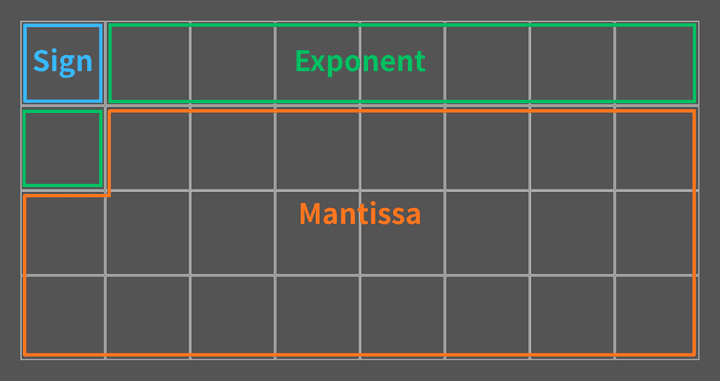 RAM (4 bytes, 32 bits)
Out of 32 bits, 1 bit is used for the sign, 8 bits for the exponent, and the remaining 23 bits for the mantissa. We know what the sign is, but the words “exponent” and “mantissa” already make our heads hurt.
It might look a bit complicated at first, but let’s go through them one by one.
Example
Let’s take the decimal 11.25 and see how it’s stored in a float.
1. Binary Conversion
Currently, 11.25 is in decimal. Let’s convert it to binary.
2. Normalization
We place the decimal point right after the leftmost 1, and multiply by a power of 2 equal to the number of positions shifted.
This process is called Normalization. The part 1.01101 is called the mantissa, and 2³ is called the exponent.
- Mantissa : The part that holds the actual value
1.01101 - Exponent : The part that determines how much to multiply the mantissa by
2³
3. Storing the Value
Now that we’ve separated the mantissa and exponent, let’s store them in RAM.
The first bit for the sign is 0 for positive and 1 for negative.
| Field | Calculated | Stored (RAM) |
|---|---|---|
| Sign (1 bit) | + |
0 |
| Exponent (8 bit) | 3 |
10000010 |
| Mantissa (23 bit) | 1.01101 |
01101000000000000000000 |
Wait! Please stop reading and take another look at the table. Did I write the numbers correctly?
If you look closely at the stored mantissa, the leading 1 has disappeared.
And the exponent has somehow become 10000010.
Why did the computer store it like this?
Exponent Bias
We said the exponent determines how far to shift the decimal point.
Shifting right requires a positive exponent, while shifting left requires a negative one.
The range of 8 bits is 0 ~ 255.
But we also need to represent negative exponents, and there are no negative numbers in this range.
So 127 was chosen as the midpoint, and the range is divided as follows:
| Stored Value | Meaning |
|---|---|
0 |
Special value |
1 ~ 126 |
Negative exponent |
127 |
Exponent of 0 |
128 ~ 254 |
Positive exponent |
255 |
Special value (∞, NaN) |
0 and 255 are special values — you don’t need to worry about them for now.
The key point is that the actual exponent plus 127 is what gets stored. This reference value 127 is called the Bias.
Some examples will make this clearer:
Now you can see why the exponent was stored as 10000010.
3 + 127 = 130, and 130 in binary is 10000010.
Hidden Bit / Implicit Bit
Now let’s see why the mantissa was stored as 01101 instead of 1.01101.
There’s a pattern in normalization: normalized binary numbers always start with 1.
The leading 1 is always there, no matter what number you normalize. So why bother storing it?
That’s why this 1. is assumed to exist, and only the fractional part after the decimal point is actually stored.
When the CPU reads the value, it automatically prepends the 1. before calculating.
This hidden 1 is called the Hidden Bit or Implicit Bit.
Thanks to this, although the mantissa field is 23 bits, the effective precision is actually 24 bits including the hidden 1.
We get 1 bit of precision for free.
The Calculation
So how does 0.1 + 1.1 actually get calculated?
Converting 0.1 from decimal to binary produces an infinitely repeating fraction:
Since float’s mantissa is 24 bits (including the Hidden Bit), the value is rounded at the 24th digit:
Converting back to decimal:
Similarly, 1.1 also cannot be represented exactly:
Adding the two:
But if you think about it, there are infinitely many numbers on a number line, and float can’t store them all. So float can only represent specific discrete values, spaced out like dots.
The result 1.20000002533 might not be one of those dots.
For example, suppose C#’s float has 1.20000004768 as one of those predetermined values.
In that case, the computer finds the nearest dot — 1.20000004768 — and stores that instead.
This process is called Rounding.
And when 1.2f is stored in a float, the same rounding happens:
In the end, both values are exactly the same:
Coincidence?
As we saw, the Rounding result of 0.1f + 1.1f is 1.20000004768.
And coincidentally, the value used when storing 1.2f in a float is also 1.20000004768.
To summarize:
- The actual result of
0.1f + 1.1fis1.20000002533. - This value is
Roundedto the nearestfloatpoint:1.20000004768. - The actual stored value of
1.2fis also1.20000004768. - So
c == 1.2fis1.20000004768 == 1.20000004768, which isTrue.
float a = 0.1f;
float b = 1.1f;
float c = a + b;

// c     : 1.20000004768… (1.20000002533… was Rounded)
// 1.2f  : 1.20000004768… (nearest representable float)
Debug.Log(c == 1.2f); // True
Now, let’s re-read the title of this section.
Was this really just a coincidence?
IEEE 754
IEEE (Institute of Electrical and Electronics Engineers)
IEEE Standard for Floating-Point Arithmetic, IEEE 754
Everything we’ve seen about how float works is neither a bug nor a coincidence.
All of it is intentional, logical behavior defined by the international standard known as IEEE 754.
IEEE 754 is a floating-point arithmetic standard established in 1985.
- How to divide
32 bits - What value to use for the
Bias - How to handle rounding (there are multiple methods, but let’s spare our brains and skip the details)
- Whether to use the
Hidden bit
99% of the world uses this standard. Its goal is to guarantee identical results for the same floating-point operations, regardless of the programming language. So does that mean float operations in C#, Python, C++, JavaScript, and other languages always produce the same result, and 0.1f + 1.1f == 1.2f is always True?
Unfortunately, no. Even when following the standard, different environments can produce different results. JavaScript treats all numbers as double (64 bits), so the precision is fundamentally different from C#, which uses float (32 bits). Results can also vary due to compiler optimizations, CPU architecture, and runtime environments.
According to stackoverflow, results can even differ depending on whether a value is stored in a variable or not.
Comparing expressions directly can return False, but comparing through stored variables can return True.
Conclusion
Let me ask you again.
Are you sure that 0.1 + 1.1 == 1.2 is False?
If I had to answer, I’d say “generally, yes, it’s False.”
But the point of this article is that answering False unconditionally isn’t always correct logic.
It’s not a bad idea to question what people and books tell you once in a while.
The bottom line: when working with decimals, be extra careful with conditionals — and especially avoid using ==.
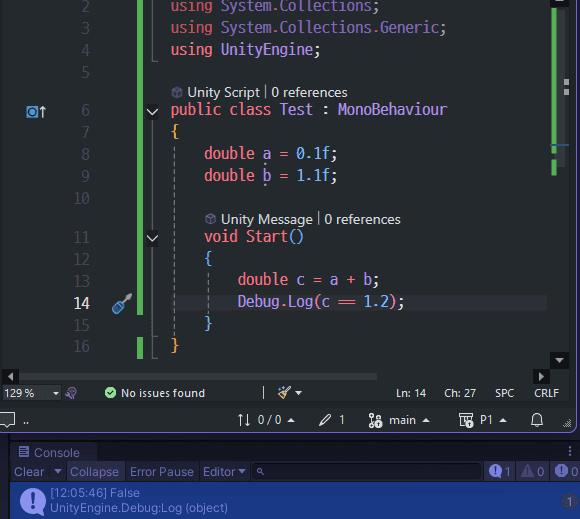 Result is false, But this may be a bias.
In computing, “bias” means making the exponent positive. But in everyday language, it means prejudice.